The 7 Best Music Collaboration Platforms in 2026 (Honest Comparison)
Not every music collaboration platform is built for the same job. Some are designed for quick file sharing between bandmates. Others are full production hubs that track versions, manage permissions, and keep your creative process moving. This guide compares seven platforms across the features that actually matter — not the marketing bullet points.
We tested each platform on five criteria: lossless streaming, version control, per-track permissions, workflow tracking, and DAW project sharing. Here's where they land.
How we evaluated
| Criterion | Why it matters |
|---|---|
| Lossless streaming | Can you hear the track in studio quality without downloading it? |
| Version control | Does the platform track iterations, or just the latest file? |
| Per-track permissions | Can you share track 3 with the vocalist without exposing track 7? |
| Workflow tracking | Does the platform show where every track stands (Concept → Completed)? |
| DAW project sharing | Can you upload Logic, Ableton, Pro Tools, or FL Studio sessions? |
The platforms
1. SoundisiaK Studio — Best for the full creative pipeline
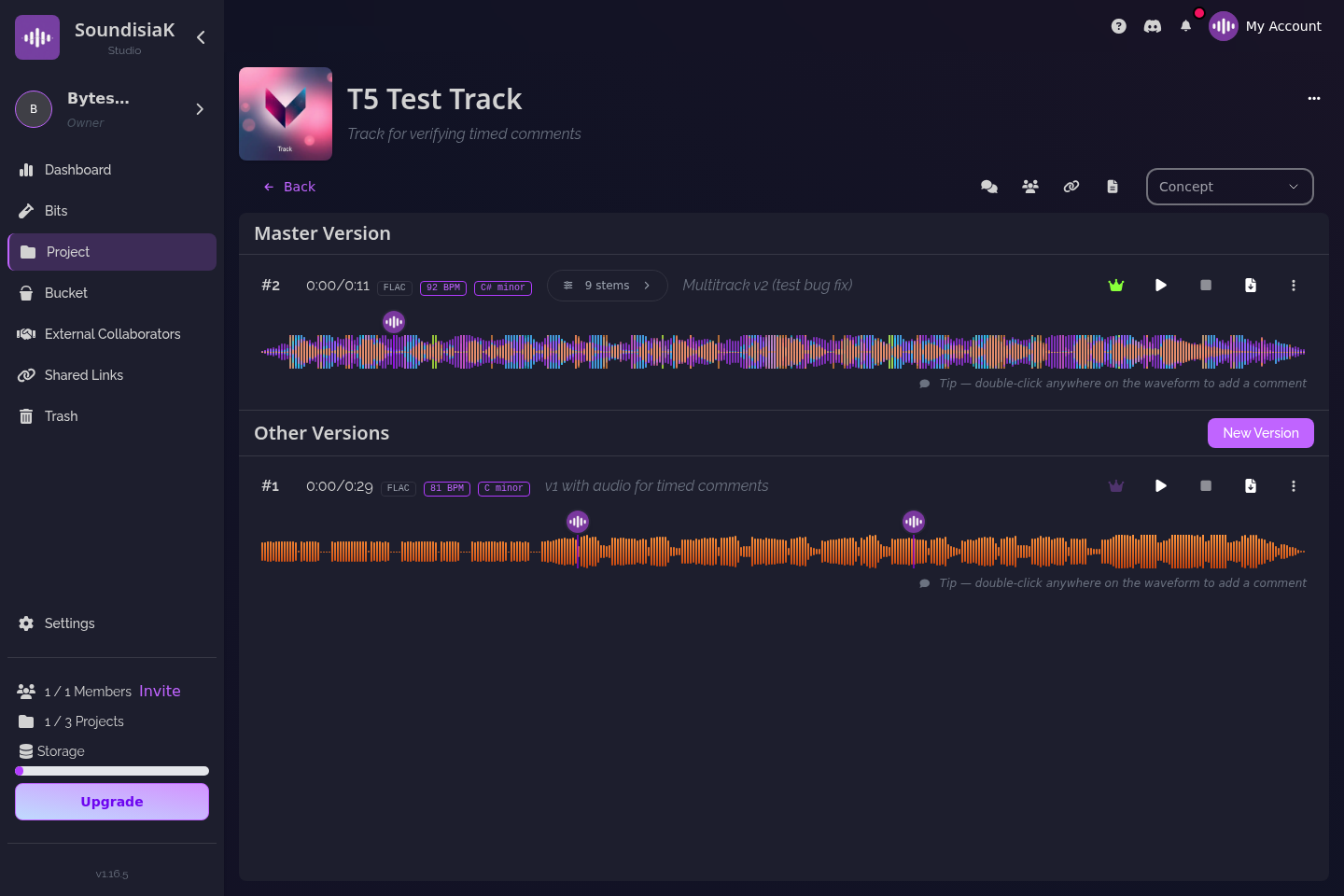
SoundisiaK Studio is built around the creative process itself — version control, per-track roles, production status tracking, lossless streaming — rather than bolted onto a file-sharing tool.
What it does well:
- Automatic version numbering on every upload. No more final_v3_REAL.wav
- Lossless streaming in the browser. Zero downloads, instant playback
- Per-stem key and BPM detection on upload
- Granular per-track permissions: your vocalist sees tracks 3, 7, and 11 — nothing else
- Workflow tracking per track: Concept → Writing → Recording → Paused → Ready for Mix → Completed
- DAW project file uploads alongside audio stems
- Bits — a dedicated ideation hub for ideas that aren't tracks yet
Who it's for: Artists, bands and labels who need more than file sharing — the whole creative process, from the first idea to the approved master, in one place.
Pricing: Free forever — 10 GB, one member, unlimited projects, tracks and versions, no credit card. Crew $12 and Studio $39 per workspace per month (per workspace, not per seat); collaborators invited to single tracks are unlimited and free on every plan.
2. BandLab — Best free option for beginners
BandLab is a social music creation platform with a built-in DAW, community features, and a massive user base. It's free, approachable, and designed to get people making music together fast.
What it does well: - Built-in web DAW (no software to install) - Social features: followers, likes, remixable projects - Huge community of beginners and intermediate producers - Free — no paid tiers for core features
Where it falls short: - No lossless streaming (compressed audio only) - No per-track role-based access — it's all or nothing - No version control — you get the latest version, period - The built-in DAW is basic compared to desktop tools
Who it's for: Hobbyists, beginners, and anyone who wants to make music socially without spending money.
3. LANDR — Best for mastering + distribution
LANDR started as an AI mastering service and expanded into distribution, samples, and collaboration. It's a Swiss Army knife for independent artists who want to finish and release music.
What it does well: - AI mastering (their original product, still solid) - Distribution to streaming platforms - Samples marketplace and plugin store - Basic collaboration via shared projects
Where it falls short: - Collaboration is an add-on, not the core product - No per-track permissions - No production workflow tracking - Mastering-first focus means the collaboration features feel secondary
Who it's for: Independent artists who want mastering, distribution, and basic collaboration in one subscription.
4. Session Studio — Best for live collaboration
Session Studio (formerly Session) focuses on real-time remote recording and collaboration. Think of it as a virtual studio where you can hear your collaborators in real time.
What it does well: - Real-time audio streaming between DAWs - Low-latency remote recording sessions - Video chat built in - Good for live tracking sessions
Where it falls short: - No asynchronous workflow — it's built for live sessions, not ongoing projects - No version control or workflow tracking - No DAW project file management - Subscription required for full features
Who it's for: Musicians who need to record together in real time across distances — not for managing the full production process.
5. Muse Sessions — Best lightweight option
Muse is a clean, simple collaboration tool focused on file sharing and feedback. It's lightweight, web-based, and gets out of your way.
What it does well: - Simple UI — upload a track, share a link, get comments - Time-stamped comments on the waveform - Clean, distraction-free design - Good for quick feedback rounds
Where it falls short: - No version history (only the latest file) - No per-track permissions — it's project-level access - No workflow tracking - No DAW project file support
Who it's for: Artists and producers who want a stripped-down feedback tool without the overhead of a full platform.
6. Amuse — Best for distribution-first artists
Amuse is primarily a free music distribution service with basic collaboration tools layered on top. It's built for artists whose main priority is getting music onto streaming platforms.
What it does well: - Free distribution to Spotify, Apple Music, and others - Basic file sharing between collaborators - Royalty tracking - Good for the release end of the pipeline
Where it falls short: - Collaboration is secondary to distribution - No version control - No per-track workflow tracking - No DAW project file support - No lossless streaming for review
Who it's for: Artists who prioritize distribution over the creation process — and need basic sharing on the side.
7. Splice — Best for sample-based producers
Splice is the dominant platform for samples, presets, and loops. Its collaboration features let you share projects and sync sample libraries with collaborators.
What it does well: - Massive sample library (millions of sounds) - Sample library syncing between collaborators (Splice Bridge) - Versioned project backups - Strong integration with DAWs
Where it falls short: - Collaboration is tied to the sample ecosystem - No per-track permissions - No production workflow tracking - Requires a Splice subscription for full access - Not built for labels or teams — more for individual producers
Who it's for: Producers who live in the Splice ecosystem and want sample sharing to be part of their collaboration.
Quick comparison table
| Platform | Lossless streaming | Version control | Per-track roles | Workflow tracking | DAW projects | Best for |
|---|---|---|---|---|---|---|
| SoundisiaK | ✅ | ✅ | ✅ | ✅ | ✅ | Full pipeline |
| BandLab | ❌ | ❌ | ❌ | ❌ | ❌ | Free + social |
| LANDR | ❌ | ❌ | ❌ | ❌ | ❌ | Mastering + distro |
| Session Studio | ✅ | ❌ | ❌ | ❌ | ❌ | Live sessions |
| Muse | ❌ | ❌ | ❌ | ❌ | ❌ | Lightweight feedback |
| Amuse | ❌ | ❌ | ❌ | ❌ | ❌ | Distribution |
| Splice | ❌ | ⚠️ basic | ❌ | ❌ | ❌ | Samples |
Which one is right for you?
If you're a solo producer sharing demos with occasional collaborators → Muse or BandLab will do.
If you need mastering and distribution alongside basic sharing → LANDR or Amuse.
If you're recording live across distances → Session Studio.
If you're a band, label, or production team that needs the full creative pipeline — version control, per-track permissions, workflow tracking, and lossless streaming — → SoundisiaK Studio is purpose-built for you.
The right tool isn't the one with the most features. It's the one that removes the most friction from your specific workflow.
SoundisiaK Studio is the music collaboration platform built for the full creative pipeline. Start a free workspace — no credit card required.