Managing Multiple Versions of Your Tracks Made Easy
A track that is going anywhere will have ten, twenty, thirty versions before it is done. The question is not how to avoid that — you should not — but how to keep thirty versions from turning into a folder nobody dares to open. This is a working method: what deserves a version, what to write on it, how to choose the one that counts, and how to compare two of them without exporting anything.
If you want the concept first, the role of version control in music production explains what a version is and why the history matters. This article is the practice.
Rule 1 — a version is a moment worth returning to
Not every save is a version. Upload one when at least one of these is true:
- Someone else needs to hear it. A bounce you want feedback on, a mix for the artist, a master for the label.
- You hand work over. Stems and the session going to a mixer; a comp coming back from a vocalist.
- You are about to try something risky. The alternate arrangement, the re-recorded chorus, the louder master. Version first, experiment second: if it loses, the previous one is still there.
- A decision was made. "This is the mix" is a version, even if the file is identical to the last upload — the description records the decision.
Everything between those moments stays in your DAW. In SoundisiaK Studio versions are unlimited on every plan, including Free, so the only cost of a version is the discipline of describing it.
Rule 2 — the description is the history
The number and date are automatic — v7, 14 March — so the description should say what the number cannot: what changed and why. Three patterns that stay readable at version twenty:
- Delta first.
vocals re-tuned · bass −2 dB at 1:12 · intro cut to 4 bars - Stage, then delta.
mix 2 — brighter top, snare tucked - Decision.
master, −14 LUFS — approved by the label
Avoid the words that lie within a week: final, new, latest, fixed. Avoid describing the file (wav 24-bit) — describe the music.
Rule 3 — mark one main version, on purpose
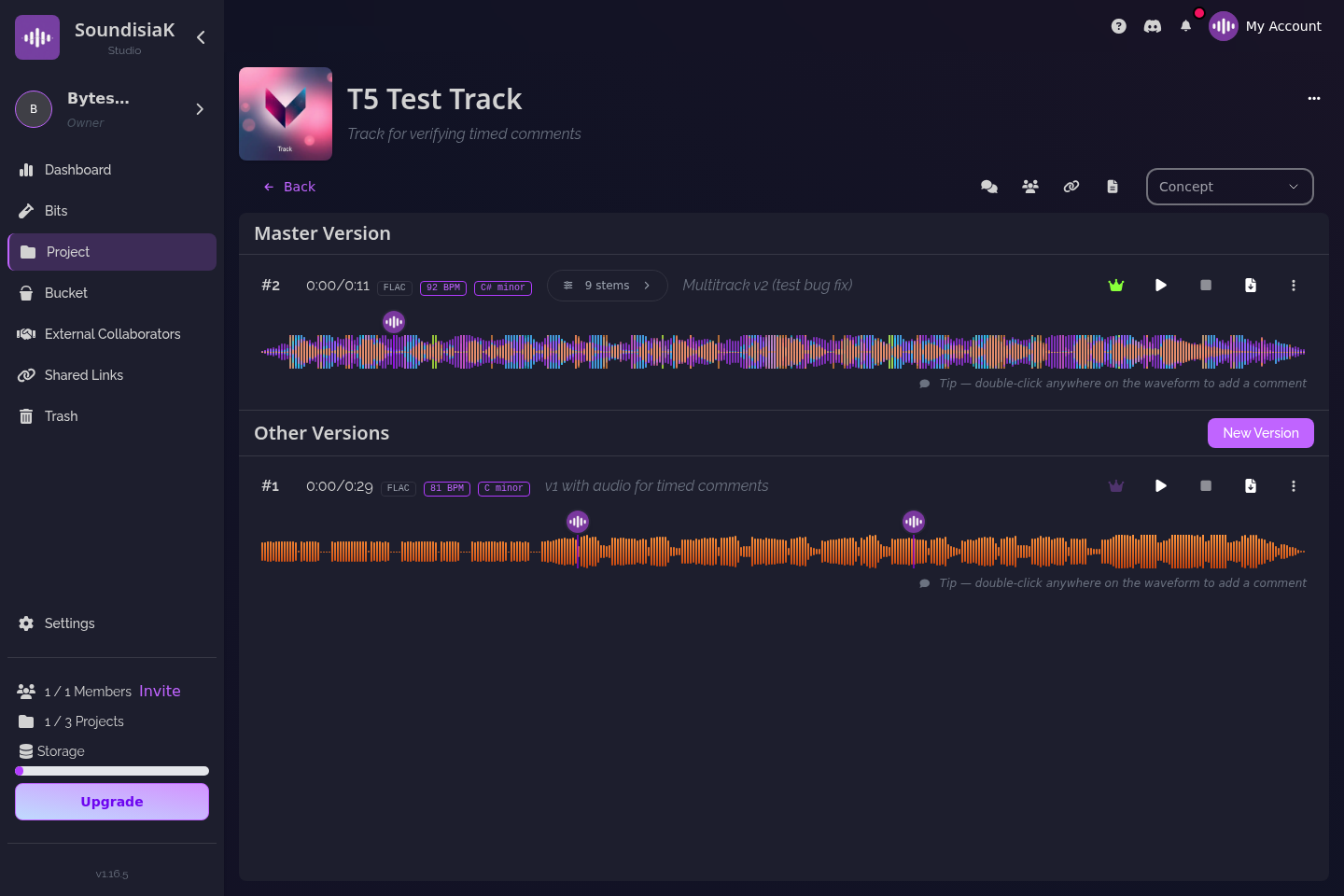
Every track in SoundisiaK Studio has exactly one main version, and it is not automatically the latest. That distinction is the whole method:
- The latest version is whatever was uploaded last — maybe an experiment, maybe a mixer's first pass you have not listened to yet.
- The main version is the one the people on this track should treat as current.
Set the main version when a decision is made, not when a file arrives. Shareable links point to it by default; collaborators see it flagged; nobody has to ask. When the alternate bridge wins, you move the flag; when it loses, you do nothing.
Rule 4 — stems when the question is "what", a mix when it is "whether"
A version can be a single mix file or a multitrack of up to 16 stems. Choose by the feedback you want:
- A mix answers whether: does this work, is it ready, which of the two is better.
- Stems answer what: is the vocal sitting right, is the bass fighting the kick, does the guitar double help. The listener can solo and mute each channel, adjust its gain, EQ and balance, or press Smart Mix for a sensible balance — in lossless FLAC/WAV, in the browser, without opening a DAW. Key and BPM are detected for each stem and for the mix.
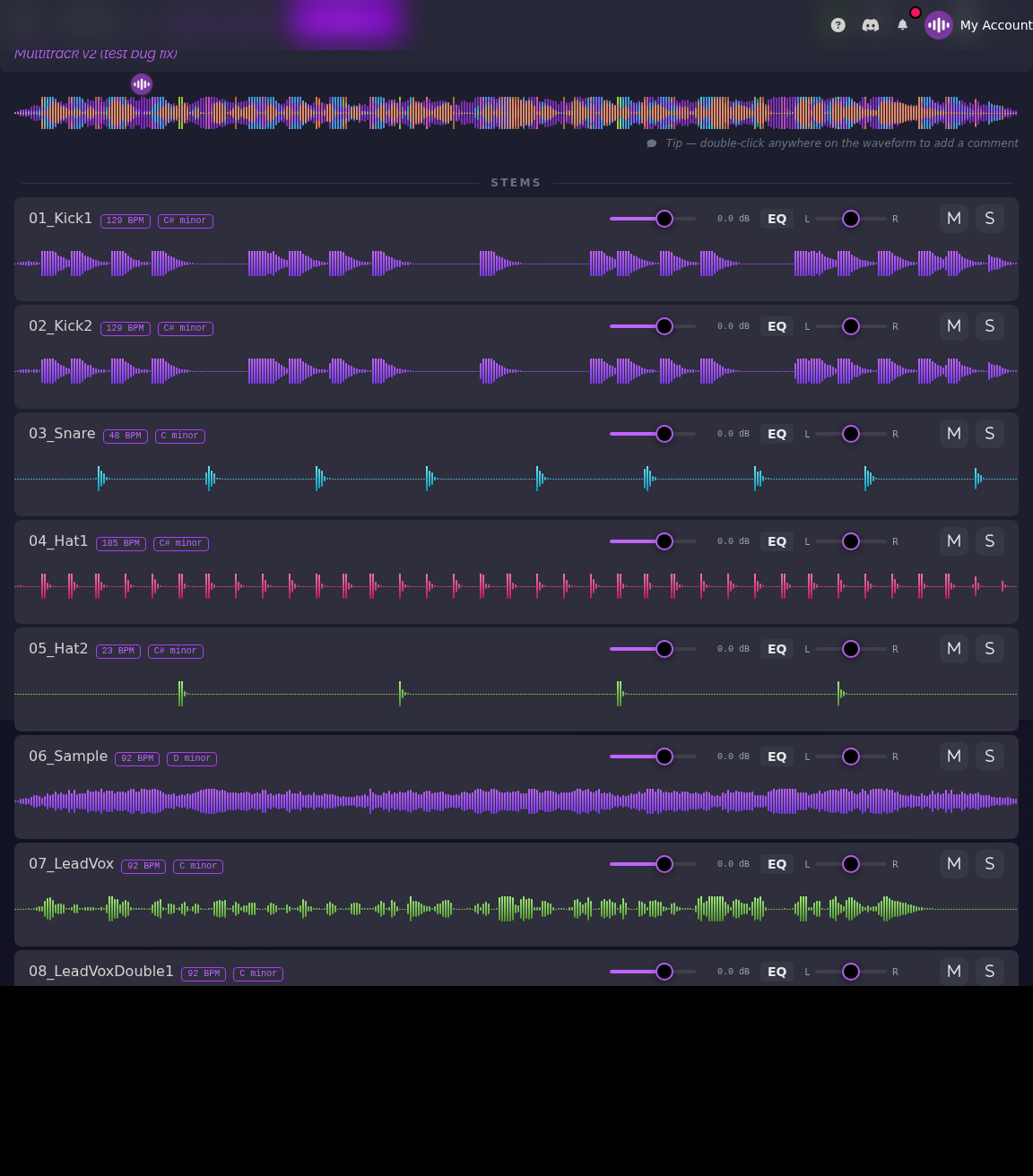
Upload stems when you hand off to a mixer or ask a musician for a part; upload a mix when you ask for a verdict. Stems vs multitracks — what to send goes into the delivery details. One practical note: a nine-stem version is transcoded and analysed after upload, and can take more than six minutes before every channel is playable; the version shows that state rather than hiding it.
Rule 5 — A/B in the browser, not in a folder
Comparing v5 and v6 should not require downloading two files and lining them up in a DAW. In SoundisiaK Studio both are on the track, both stream lossless, and the comments on each are pinned to that version's waveform. Listen to v5, listen to v6, read what was said about each, decide — then move the main flag. If the comparison is about a stem, open both multitracks and solo the same channel.

Rule 6 — keep the session with its bounce
The commonest way to lose a version is to keep the audio and lose the project that made it. Upload the DAW workfile next to the audio of the version it produced — Logic, Ableton, Pro Tools, FL Studio, any — and download the two together as the version's ZIP. DAW project sharing that actually works covers what to include so the session opens on another machine.
Rule 7 — let the track's status carry the context
A track moves through Concept, Writing, Recording, Paused, Ready for Mix, Completed. The status tells a collaborator how to read a version before they press play: v3 in Writing is a sketch and the comment should be about the song; v3 in Ready for Mix is a deliverable and the comment should be about the balance. Change the status when the work changes phase, and the versions sort themselves into chapters.
What this looks like after a year
Thirty versions on a track, and you can still find anything: the number tells you the order, the description tells you the change, the status tells you the phase, the main flag tells you the reference, the comments tell you why. Delete a track by mistake and it is in the trash, recoverable. None of it depends on a file-naming convention surviving contact with three collaborators.
That is the difference between version control and a well-organised folder — cloud storage for musicians spells it out — and how to stop losing takes adds the recording-day habits that feed into it.
FAQ
How many versions can a track have? As many as you need. Projects, tracks and versions are unlimited on every SoundisiaK Studio plan, the Free plan included; only storage is counted.
Is the latest version automatically the main one? No, and that is deliberate. The main version is a decision you make; the latest is just the most recent upload. A mixer's first pass can be the latest without being the reference.
Can I compare two versions without downloading them? Yes. Both stream lossless in the browser, with their own timestamped comments; for stems, open both multitracks and solo the same channel.
What happens if I delete a version or a track by mistake? It goes to the trash and can be recovered. Nothing is overwritten when you upload a new version.
Thirty versions, zero confusion. Start free on SoundisiaK Studio →