Why SoundisiaK Studio is a Game-Changer for Beatmakers
A beatmaker's problems are specific. Fifty loops in a folder and no idea which one was in A minor at 140. A rapper who asks for "that beat from last month" and you have four candidates. A pack sent by WeTransfer that is now on a stranger's drive. A vocal that comes back recorded on a bounce from two versions ago. None of these is a DAW problem; your DAW is fine. They are what happens around the DAW — and that is the part SoundisiaK Studio is built for. Here is what you actually get, and, just as important, what you do not.
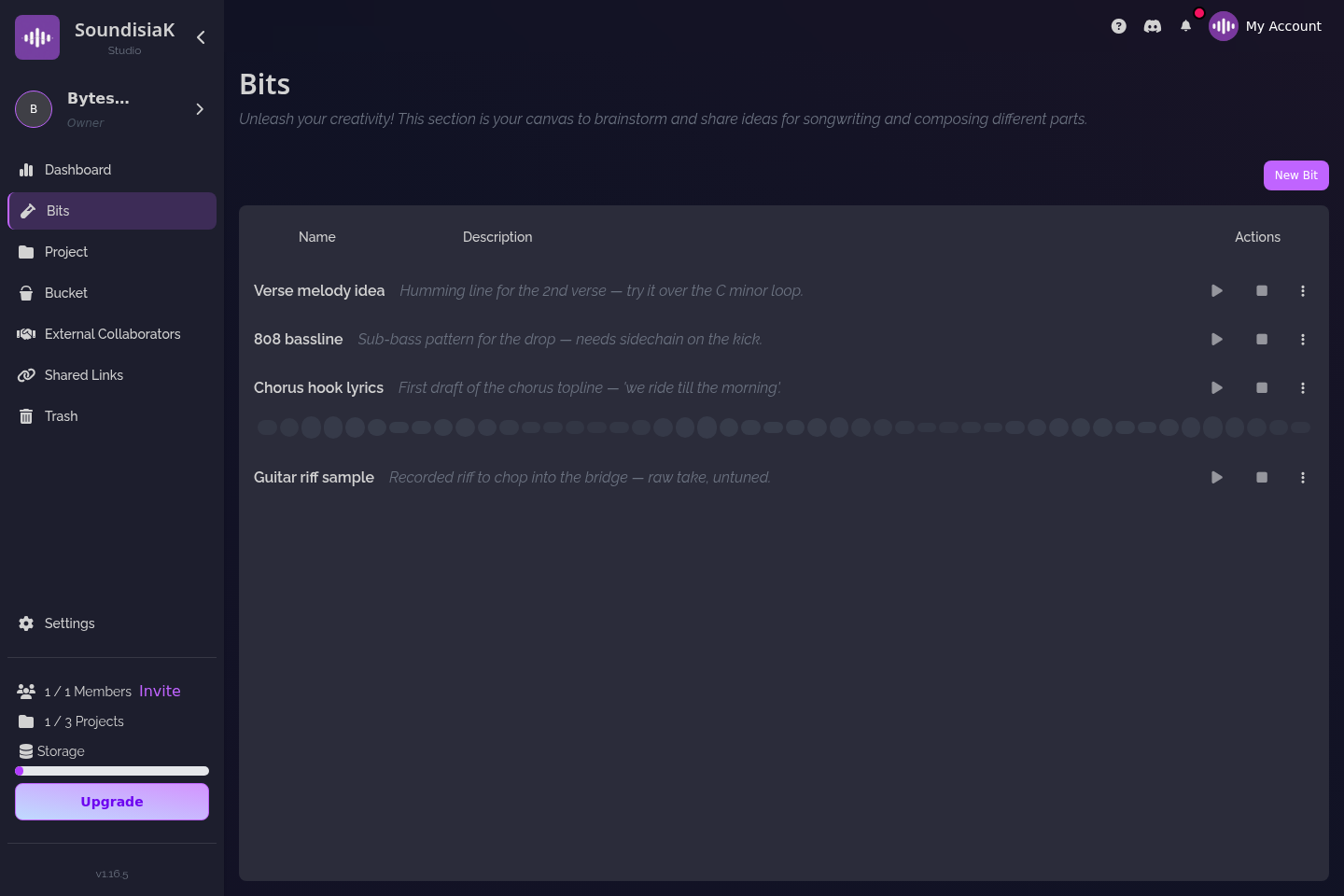
Ideas land in Bits, not in a voice memo
The chord progression you hum into your phone at 1 a.m. does not need a project yet. It needs to be kept. Bits is the scratchpad inside SoundisiaK Studio for exactly that: a melody, a drum pattern, a sample you want to flip, a line of lyrics — captured as an idea with a note, before it deserves a track. When it is ready, a Bit becomes a track in a project in one move, and the idea's history comes with it.
Every beat knows its key and tempo
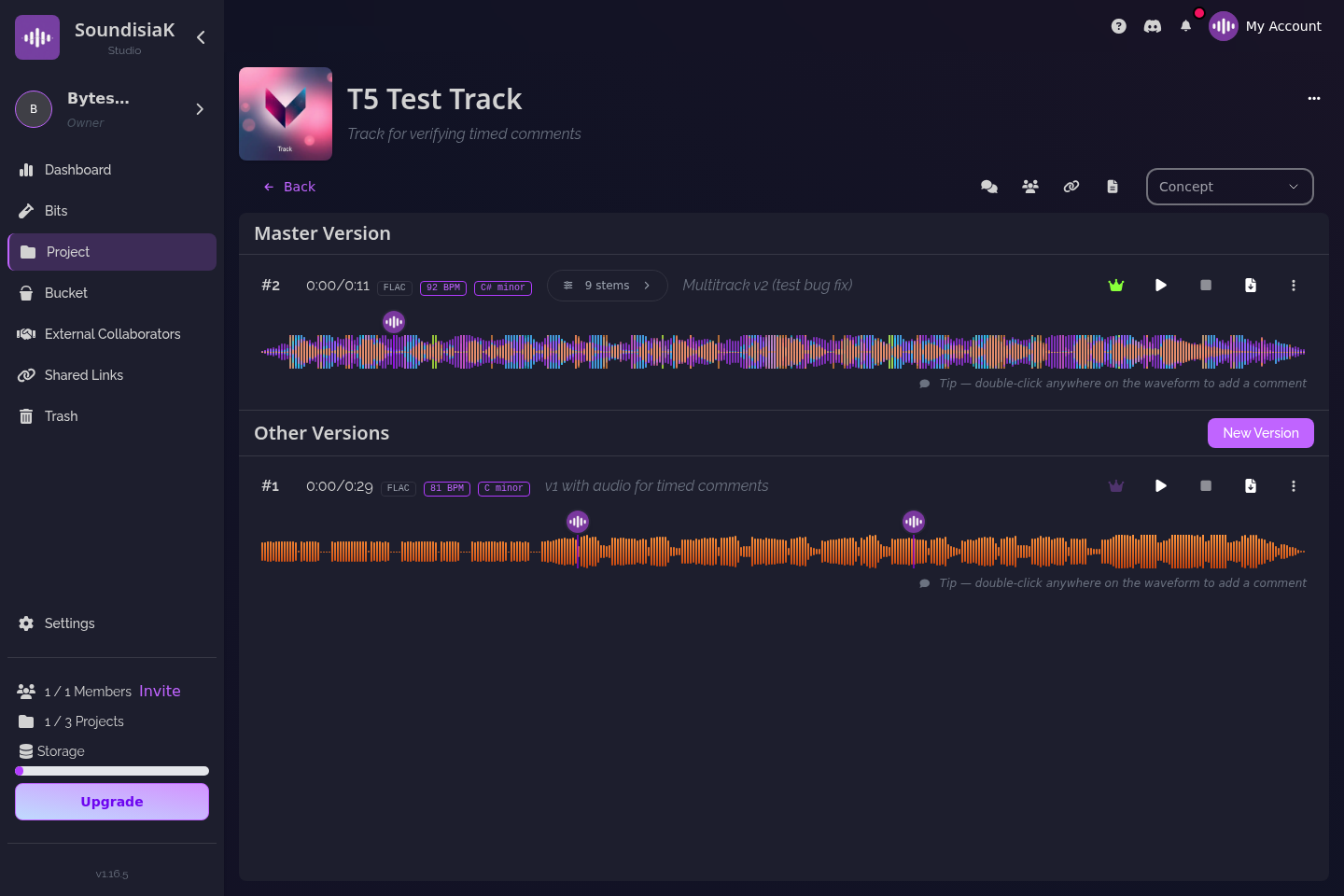
Upload a beat and SoundisiaK Studio detects its key and BPM automatically — for the mix, and for each stem if you upload a multitrack. That turns the folder problem into a non-problem: when a singer says "I'm comfortable around F minor, slow", you are looking at keys and tempos, not opening files. The same detection runs on the vocal stem that comes back, so a key clash is visible before anyone records a second take.
A beat has a history, from loop to placement
A beat is rarely one file. There is the loop, the arrangement, the version with the hook, the one with the artist's vocal, the mixed one, the one the label wanted two dB louder. In SoundisiaK Studio each of those is a numbered version on the same track, with a date, a description you write ("arranged, 8-bar intro, open hat added"), and — if you want — the FL Studio, Ableton or Logic project next to the audio. One version is flagged main: the one you would send today. Nothing is overwritten; the loop from February is still v1 when the song comes out in June.
Managing multiple versions of your tracks is the method; the role of version control in music production is the why.
Pitch a beat without handing over the file
This is the one beatmakers ask about first. A shareable link lets an artist, a manager or an A&R hear the beat without an account and without receiving a file: the link can be listen-only, carry a password and an expiry date, and be revoked the moment you change your mind. It streams lossless, so they hear the beat as you bounced it, not a 128 kbps preview. And it reports views, plays and completions — so you know whether the link was opened, whether the beat was played past the drop, and whether the one link you sent to one person has somehow been played forty times.
Compare that with a tagged MP3 by email: once sent, it is theirs forever, and you learn nothing. Why secure file sharing is essential for musicians walks through the four questions behind every link.
The artist on your beat sees your beat — and nothing else
When an artist records on your beat, invite them as a collaborator on that one track. They get a free account, see that track's versions and comments, upload their vocal as a stem, and never see the rest of your catalog. Collaborators are unlimited and free on every plan, the Free plan included. The same goes for the mixer you hand the stems to: one track, one job.
Feedback happens on the waveform, at a timestamp, per stem: "the 808 is fighting the kick at 0:47" lands at 0:47 of that version, on the bass channel, where the artist and the mixer will both find it. The listener can solo the vocal against your beat, pull the drums down, or press Smart Mix — in the browser, losslessly, without a DAW. Sharing work-in-progress music for feedback covers the routine.
What SoundisiaK Studio is not, so you choose it for the right reason
- Not a beat marketplace. There is no store, no lease or exclusive-license checkout, no contracts. Links let you pitch and protect a beat; the deal is yours to make elsewhere.
- Not a sample library. Nothing to browse, nothing to download by credit. If that is what you are after, our honest take on Splice says so plainly.
- Not a DAW. It does not make the beat; it keeps track of it. If you make beats on your phone inside a social app, the BandLab comparison explains where each tool belongs.
- Not a social network. Private by design: your workspace is yours, and the only people who see a beat are the ones you put on it.
What it costs
The Free plan is free forever: 10 GB of encrypted storage, one member, unlimited projects, tracks and versions, no credit card — enough to run a real catalog of beats, with Bits, shareable links and multitrack included. When other people join your workspace (not collaborators — those are free), Crew is $12 a month for five members and 100 GB, Studio $39 for ten members and 500 GB; both are priced per workspace, not per person. Storage and headcount are the only differences between plans.
A working day, in SoundisiaK Studio
Say you make three beats on a Tuesday. Each goes in as a track, key and BPM detected on upload, a one-line description each ("dark, 92 BPM, G minor, open for a hook"). On Thursday a singer asks for something slow in a minor key; you filter by ear and by the numbers, and send her a listen-only link with a one-week expiry. The counters show two full plays that evening. She wants the second one; you invite her as a collaborator on that track, she uploads her vocal as a stem on v2, you comment at 1:12 "double the ad-lib here", and v3 — vocal doubled, beat trimmed to 3:10, FL project attached — becomes main. The mixer gets v3's stems and session; v4 comes back; you A/B v3 and v4 in the browser, mark v4 main, and send the label a listen-only link. The other two beats are still there, keys and tempos known, waiting for the right voice.
FAQ
Can I pitch a beat without the artist being able to download it? Yes. A shareable link can be listen-only: the artist streams the beat losslessly in the browser without receiving a file, and you see views, plays and completions. Add a password and an expiry if you like, and revoke the link at any time.
Does SoundisiaK Studio sell or lease beats for me? No. It is not a marketplace and has no licensing checkout. It lets you pitch, protect and version your beats; the deal itself happens wherever you make deals.
Does it detect the key and BPM of my beats? Yes, automatically on upload — for the mix and for each stem of a multitrack. The same runs on the vocal stems that come back, so a key clash is visible before a second take.
Is the free plan enough for a beat catalog? Projects, tracks and versions are unlimited on the Free plan, with 10 GB of encrypted storage, one member, and unlimited free collaborators on your tracks. You only pay when more people need the whole workspace.
Fifty beats, every key and tempo known, none of them on a stranger's drive. Start free on SoundisiaK Studio →